
UK GUIDE · TESTING UPDATED 24 OCTOBER 2026
Does Google Analytics Need Cookie Consent in the UK?
Google Analytics 4 is widely used to measure traffic, page views, user journeys and conversions. In 2026, the UK position is more nuanced than a simple “yes” or “no”: a new statistical-purposes exception can apply to some analytics use, but only where specific conditions are met.
This guide explains when GA4 may require consent, when the 2026 analytics exception may be relevant, how Google Consent Mode fits in, and how to test what your website is actually doing.
UK rules section last reviewed: 26 September 2026 · Technical testing updated: 24 October 2026 · Practical website guidance only. Not legal advice or formal compliance certification.
Google Analytics Cookie Consent: The 2026 Answer
For many standard GA4 implementations, consent will still be needed. However, UK law now includes a limited statistical-purposes exception for storage or access used solely to collect statistical information about how a website or service is used, with a view to improving it.
Consent May Still Be Needed
Especially where analytics is combined with advertising, profiling, remarketing, cross-service tracking or purposes beyond simple website statistics.
A 2026 Exception Now Exists
The statistical-purposes exception can apply where the sole purpose is collecting statistical information to improve the website or service and the statutory conditions are met.
GA4 Is Not Automatically Exempt
The fact that a tool is described as “analytics” does not itself mean every use of that tool falls within the exception.
By John Cookie · Technical testing updated 24 October 2026
Which cookies does Google Analytics 4 use?
Google lists these two common first-party cookies for its GA4 JavaScript tags. Use them as a starting point for inspection, then confirm the actual names, scope and expiry on your website.
| Cookie | Purpose | Documented default expiry |
|---|---|---|
_ga | Helps distinguish website users. | 2 years |
_ga_<container-id> | Maintains session state. | 2 years |
Verify the real duration. Google cookie settings can be changed, and browser restrictions can shorten storage. An expiry shown as two years in documentation is not evidence of the setting on your site. Linked advertising products may also add cookies beyond this short list.
For each test, record the cookie name, domain, path and expiry before and after the choice. A cookie that was already there is different from a new write. Use the GA4 rejection investigation when a cookie or request remains after Reject.
Source: Google Analytics: cookie usage on websites, checked 24 October 2026. Google also explains that its tags can transmit data without setting cookies.
The UK Statistical-Purposes Exception
The ICO’s 2026 Storage and Access Technologies guidance confirms that consent is not required under PECR where the statistical-purposes exception applies. The exception is narrow and depends on how the technology is actually used.
Sole Statistical Purpose
The storage or access must be for the sole purpose of collecting statistical information about use of the website or service with a view to improving it.
Clear Information
Users must receive clear and comprehensive information about the purpose of the storage or access.
Simple, Free Objection
The website must provide a simple means for the user to object to the storage or access, free of charge.
Important Limits
The ICO also says the information should be aggregated and personal data should not be kept longer than necessary for the aggregation process. If the use goes beyond the statistical purpose — for example by making inferences or decisions about people, retaining individual-level information beyond aggregation, or using the data for wider advertising or tracking purposes — the exception will not apply and consent may be required.
When Might GA4 Still Need Consent?
Whether a particular GA4 setup can rely on the statistical-purposes exception depends on purpose and configuration. These are practical warning signs that the use may extend beyond simple aggregate website statistics.
Google Ads Linking
If Analytics data is used with Google Ads for advertising measurement, remarketing, audience creation or other advertising purposes, review whether the use still falls within the narrow statistical purpose.
Google Signals or Advertising Features
Features linked to advertising personalisation, cross-device reporting or broader advertising use should be reviewed separately from basic website statistics.
Individual-Level Retention or Profiling
The ICO distinguishes temporary information needed for aggregation from individual-level information kept beyond that process. Using information to profile people or make decisions about them falls outside the statistical-purposes exception.
Why Google Analytics Consent Still Needs Testing
A cookie banner can look correct while Google Analytics is installed elsewhere through Google Tag Manager, a plugin, a theme, Shopify or another platform integration.
The practical question is not only what the banner says. It is what the website actually stores, accesses and sends before a visitor makes a choice, after rejection and after acceptance.
That is why a technical review should identify how GA4 is installed, how consent states are communicated and whether advertising or other purposes are also involved.

Google Consent Mode and GA4
Google Consent Mode lets supported Google tags adjust their behaviour according to a visitor’s consent choices. For GA4, analytics_storage is the key storage signal.
analytics_storage: granted
Google Analytics can use analytics storage normally, subject to the wider implementation and settings.
analytics_storage: denied
Google says analytics cookies are not read or written. In Advanced Consent Mode, measurements without cookies may still be sent to Google Analytics for basic measurement and modelling.
Consent Mode does not itself determine whether your GA4 implementation can rely on a PECR exception. It is a technical framework for communicating consent states to Google tags. See our Google Consent Mode v2 UK guide for the Basic vs Advanced distinction and the four main consent signals.
How to Review Your Google Analytics Consent Setup
The exact answer depends on how GA4 is installed and what it is used for. Start with the technology, then the purpose, then the consent behaviour.
Step One: Find Every GA4 Installation
List where GA4 is added: GTM, website code, a plugin, theme or platform integration. Check whether more than one route loads the same tag before changing anything.
Step Two: Identify the Purpose
Separate simple website statistics from advertising, remarketing, audience creation, profiling or other uses. The purpose matters to the 2026 exception.
Step Three: Test the Real Behaviour
Check before choice, after Reject, after Accept and after changing a saved preference. Look at both consent signals and actual cookies, storage and network requests.
How to Test Google Analytics Cookie Consent
Use the Tag Assistant consent-event walkthrough to compare the default and update values alongside your browser storage and network evidence.
If GA4 behaviour appears inconsistent with your banner choices, our £395 Google Consent Mode audit examines the agreed consent states, storage and network activity, with authorised configuration checks where needed. You receive prioritised PDF findings and a 30-minute walkthrough. No VAT is added. The audit records technical observations; it does not determine whether your use of analytics qualifies for a legal exception.
Download the illustrative sample audit report (PDF, 4 pages) for the evidence, action and retest format. Its findings are fictional; it contains no client test results.
Record the page URL, date, browser, starting consent state and action taken for each test. Keep banner screenshots separate from cookie, storage and network evidence so that another person can understand what was actually checked.
Use fresh sessions for separate Reject and Accept tests. Test withdrawal after acceptance.
- Before any choice
Open a fresh session and leave the banner untouched.
Check: the default consent state and any cookies, storage or requests.
- After rejection
Reject optional categories, including analytics.
Check: denied signals and behaviour matching the intended Basic or Advanced setup.
- After acceptance
Grant analytics consent through the banner.
Check: the consent update and resulting analytics storage and requests.
- After withdrawal
Accept first, then reopen settings and withdraw analytics consent.
Check: the new state, subsequent behaviour and whether the choice survives navigation.
Compare all three: consent signals · cookies and browser storage · network requests. In Advanced Consent Mode, denied consent can still involve measurements without cookies. Withdrawal does not erase data already sent.
Technical reference: Google’s consent verification guidance.Before Any Choice
Open a fresh private session. Check whether GA4 tags load, whether analytics cookies appear, what the analytics_storage state is and what requests are sent to Google Analytics.
After Rejection
Reject optional technologies. Check whether the analytics consent state and actual GA4 behaviour reflect the rejection. In Advanced Consent Mode, measurements without cookies may still be sent. For a step-by-step investigation, see why GA4 activity can appear after rejecting cookies.
After Acceptance
Accept the analytics category and confirm the expected consent update. Check that the website does not accidentally grant advertising consent where only analytics was selected.
Use Google’s Tag Assistant verification steps to compare the default consent state with updates after visitor choices. Combine that with browser cookie, storage and network inspection. A banner screenshot alone does not verify GA4 behaviour.
Google Analytics Consent Checklist
- Identify every GA4 installation on the website.
- Check whether GA4 is used only for website statistics.
- Check whether Google Ads is linked.
- Check whether Google Signals or advertising features are enabled.
- Review whether individual-level information is retained or used.
- Confirm what the cookie banner tells visitors about analytics.
- Confirm whether a simple, free means to object is available where the statistical exception is relied upon.
- Check the default
analytics_storagestate. - Test before any visitor choice.
- Test Reject.
- Test Accept.
- Test changing or withdrawing a saved choice.
- Look for duplicate GA4 tags.
- Compare actual behaviour with your cookie and privacy information.
Why can GA4 activity appear after rejecting cookies?
First identify what you are seeing: an existing cookie, a new storage write, a network request or a dashboard total. Advanced Consent Mode can send measurements without cookies when storage consent is denied. A visible request alone does not establish whether a new cookie was written or whether the setup matches the intended design.
| Observation | Next comparison |
|---|---|
| A GA cookie remains after Reject | Compare its pre-choice presence and expiry. Repeat rejection from a clean starting state. |
| A new GA cookie appears in a clean rejected run | Record the write time and consent event; trace the responsible installation. |
| A request occurs while storage is denied | Check the intended Basic or Advanced implementation and the request and storage evidence together. |
| Only a report or dashboard shows activity | Capture one browser journey. Aggregate totals do not identify that visitor’s consent sequence. |
Follow the full GA4 rejection troubleshooting workflow for clean-run comparisons, installation tracing and retesting. Keep the observed behaviour separate from any assessment of processing purposes or legal requirements.
Read an analytics-only update correctly
The capture below comes from CookieBanner on 4 October 2026, in a session with an analytics-only choice already saved. It is a reading example, not evidence of a Reject test.
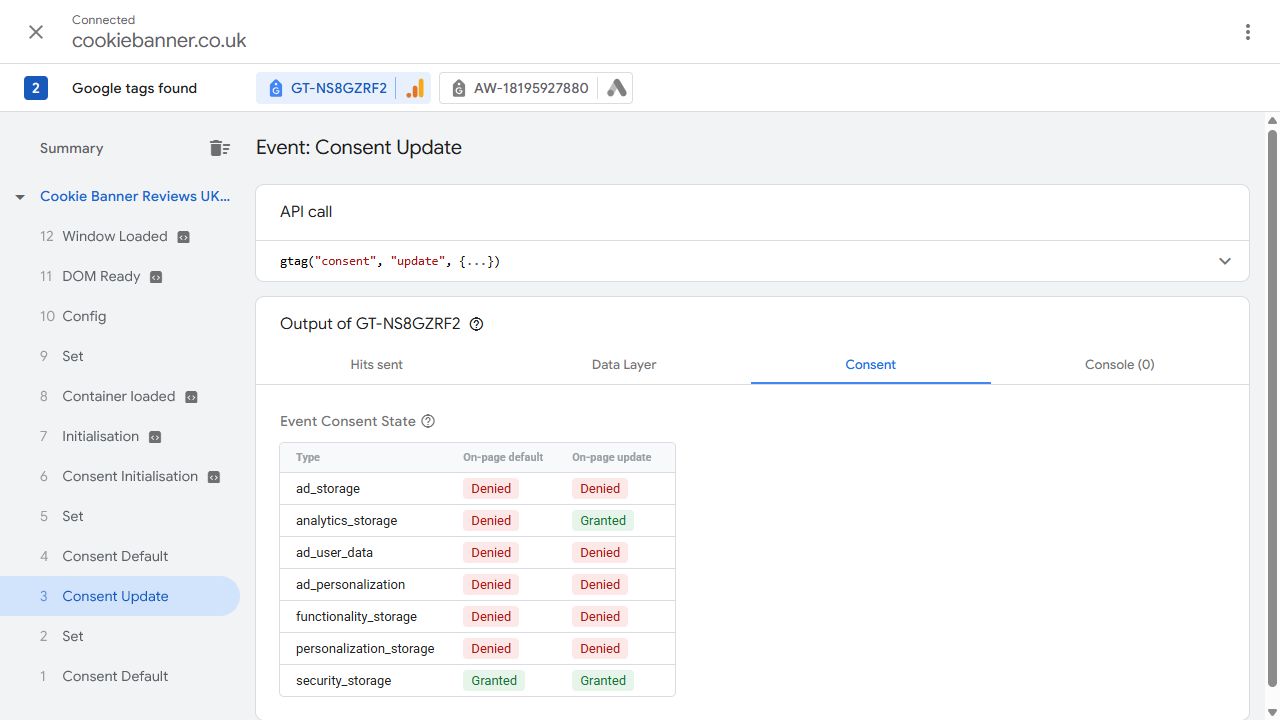
What this establishes: the displayed consent values for the selected event and Google tag. Cookie writes, request payloads, withdrawal, rejection and conversion accuracy are not established by this screenshot. The original walkthrough records the session limits.
Technical references: Google’s Basic and Advanced Consent Mode overview and consent verification with Tag Assistant, checked 24 October 2026.
Common Google Analytics Consent Mistakes
Assuming All Analytics Needs Consent
The 2026 statistical-purposes exception means this is no longer always correct. The correct answer depends on purpose and conditions.
Assuming GA4 Is Automatically Exempt
The exception is purpose-based. GA4 used for advertising, profiling or wider tracking may fall outside it.
Testing Only the Banner
A banner can show the right wording while GA4 is loaded elsewhere through GTM, a plugin, a theme or a platform integration.
Need a Practical Google Analytics Consent Review?
If you need help turning these checks into a practical brief, see the Google Consent Mode Audit. Start with a free initial check of public information and visible signals, or discuss a paid review with an agreed scope and prioritised findings. Confirm which technical tests are included before commissioning the work.
- GA4 and Google tag observations
- Consent Mode signal checks
- Behaviour before choice
- Reject and Accept behaviour
- Possible duplicate tags
- Practical points for your developer, PPC agency or marketing team
Google Analytics Cookie Consent FAQs
Does Google Analytics need cookie consent in the UK in 2026?
Often yes, but not always. A limited statistical-purposes exception now exists under PECR. Whether it applies depends on the sole purpose of the storage or access and whether the statutory conditions are met.
Is Google Analytics 4 automatically covered by the analytics exception?
No. The exception is not based simply on the name of the product. It depends on how the technology is configured and used.
Can GA4 be used without consent for basic statistics?
Potentially, where the statistical-purposes exception genuinely applies and all of its conditions are met. That requires a purpose-limited implementation, clear information, a simple free means to object and appropriate aggregation and retention practices.
Does linking GA4 to Google Ads matter?
It can. If Analytics data is used for advertising, remarketing, audience creation or other purposes beyond simple website statistics, review whether the statistical exception still applies.
Does Google Consent Mode replace a cookie banner?
No. Consent Mode communicates consent states to Google tags. It does not provide the visitor-facing consent mechanism itself.
What happens when analytics_storage is denied?
Google says GA4 will not read or write first-party analytics cookies. In Advanced Consent Mode, measurements without cookies may still be sent to Google Analytics for basic measurement and modelling.
How should I test GA4 consent?
Test before any choice, after Reject, after Accept and after changing or withdrawing a saved choice. Check the real consent signals, cookies, storage and network behaviour.
Official Guidance and Platform Sources
Related Cookie Banner Guides
Find signals, then test the setup
Run the free instant cookie and tracking checker to look for Google Analytics and other references in your public homepage source. A reference cannot establish whether GA4 runs or respects a visitor’s choice; confirm that through the browser tests described above.
Once you have verified the technologies, purposes and durations, use the UK cookie policy generator to prepare a draft declaration. Browse all free tools →
Check Your Google Analytics Consent Setup
Start with a free initial check of your public website and visible tracking signals. Send your website URL and the GA4 question you want answered. For consent-state, storage and network testing, see the £395 Google Consent Mode audit scope. Any paid work is agreed before you decide.
This is practical website guidance only and is not legal advice or formal compliance certification.