
Google Consent Mode v2 is now an important part of cookie banner compliance for UK websites using Google Analytics, Google Ads, Google Tag Manager or remarketing tools.
But there is a common problem: many websites display a cookie banner while still allowing analytics, advertising or tracking scripts to load before the visitor has given consent. That means the banner may look compliant, but the website behaviour behind it may still need fixing.
This guide explains what Google Consent Mode v2 does, why it does not replace a cookie banner, and how to check whether your UK website is tracking visitors before consent.
Quick answer: does Google Consent Mode v2 make a website compliant?
No. Google Consent Mode v2 can help your website communicate consent choices to Google services, but it does not replace a compliant cookie banner, a proper reject option, accurate cookie policy wording or correct tag configuration.
The key issue is whether non-essential tracking is blocked or controlled before consent is given.
What is Google Consent Mode v2?
Google Consent Mode v2 is a Google framework that allows Google tags to adjust their behaviour based on a visitor’s consent choices. It is commonly used with Google Analytics 4, Google Ads, Google Tag Manager, conversion tracking and remarketing.
In simple terms, your website sends consent signals to Google. These signals tell Google whether the visitor has agreed to certain types of storage and data use, such as analytics storage, advertising storage, ad personalisation and user data for advertising purposes.
That does not mean Consent Mode is a cookie banner. It is not. Your cookie banner is the part visitors see and interact with. Google Consent Mode v2 is part of the technical setup that should help your tags respond to that choice.
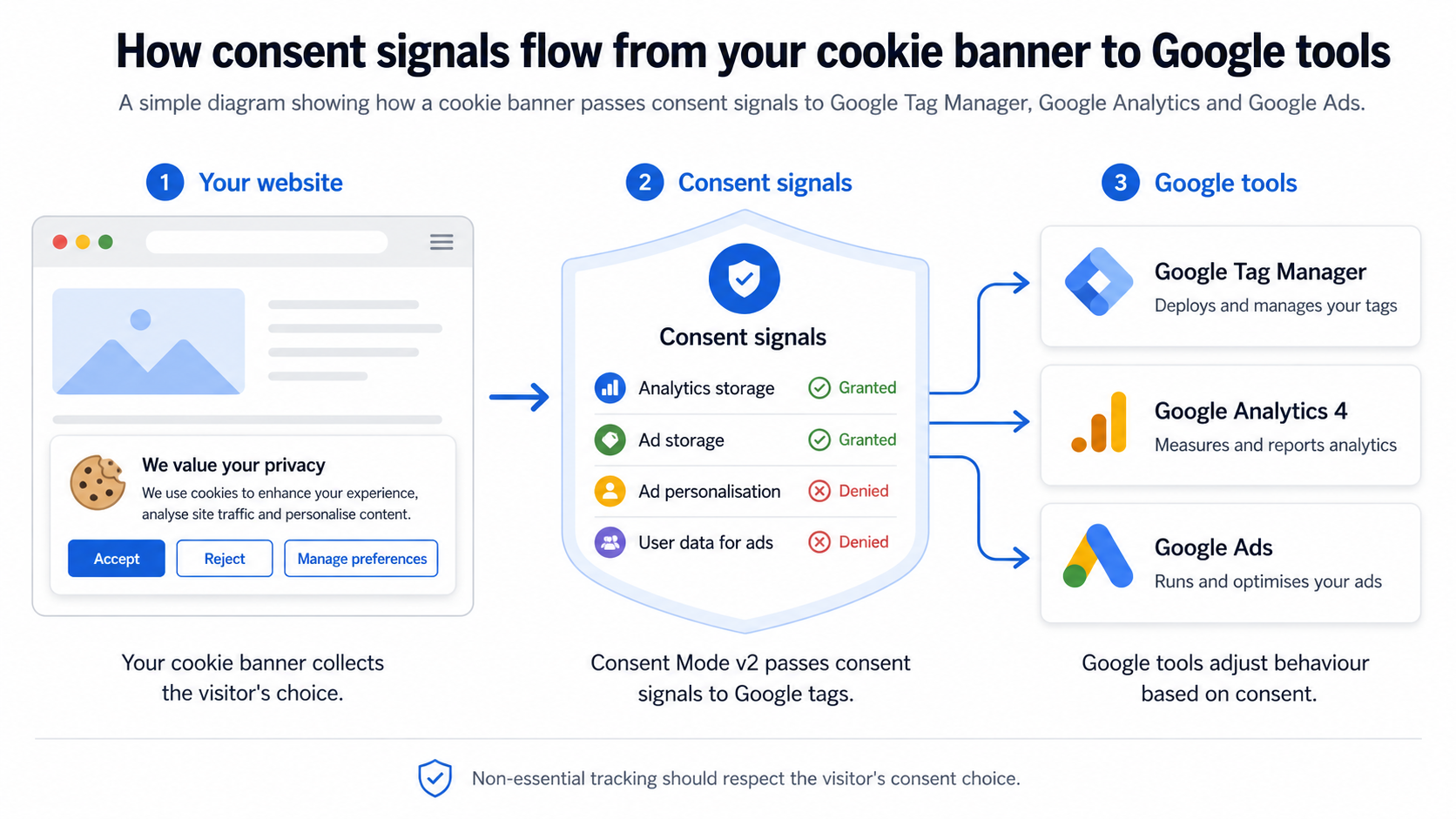
Google Consent Mode v2 is not the same as a cookie banner
This is one of the biggest misunderstandings. A cookie banner collects the user’s consent choice. Google Consent Mode v2 helps Google services understand and respond to that choice.
If your cookie banner is poorly configured, has no proper reject option, or does not correctly communicate consent choices to your tags, Google Consent Mode v2 will not automatically fix the issue.
- A cookie banner should ask for consent before non-essential cookies or tracking are used.
- Google Consent Mode v2 should help Google tags respond to the visitor’s consent status.
- Google Tag Manager should only fire tags when the correct consent conditions are met.
- Your cookie policy should accurately describe the cookies and tracking technologies actually used on the site.
Why UK websites still need proper cookie consent
UK websites using non-essential cookies or similar tracking technologies normally need to obtain consent before those technologies are used. This commonly includes analytics, advertising pixels, remarketing tags, social media tracking, embedded video tracking, heatmaps and CRM tracking tools.
Some cookies are genuinely necessary for a website to work, such as security, checkout or login-related cookies. However, tools used for marketing, analytics, ad measurement, conversion tracking or remarketing should not be treated as essential simply because they are commercially useful.
For a broader starting point, read our guide on whether your website needs a cookie banner in the UK.
What should happen before consent?
Before a visitor gives consent, non-essential tracking should normally be blocked or restricted. The website should not simply load Google Analytics, Meta Pixel or advertising scripts immediately and then ask for permission afterwards.
- Google Analytics should respect the visitor’s analytics consent choice.
- Google Ads conversion and remarketing tags should respect advertising consent.
- Meta Pixel should not fire for marketing or remarketing before consent.
- Google Tag Manager should not trigger non-essential tags before the correct consent state is known.
- The reject button should prevent non-essential tracking rather than just close the banner.
- The cookie policy should match the real cookies and scripts found on the website.
For a more detailed check, see our guide on tracking before consent.
Common Google Consent Mode v2 setup problems
These are the issues we often see when reviewing UK websites using Google Analytics, Google Tag Manager, Google Ads or Meta Pixel.
Tracking fires too early
Google Analytics, Google Ads or Meta Pixel loads as soon as the page opens, before the visitor has clicked accept.
Reject does not work properly
The banner has a reject button, but analytics or marketing scripts still continue to run afterwards.
GTM is misconfigured
Google Tag Manager is installed, but consent conditions have not been applied properly to the tags inside the container.
Cookie policy mismatch
The cookie policy lists generic cookies, but does not match the actual cookies, pixels and scripts found on the website.
Plugins bypass the banner
WordPress plugins, booking tools, chat widgets or embedded media load cookies separately from the main banner setup.
Consent signals are incomplete
The banner collects a choice, but the correct Consent Mode v2 signals are not being passed to Google services.
Basic Consent Mode vs Advanced Consent Mode
When people talk about Google Consent Mode v2, they often miss an important distinction: basic and advanced implementation. The difference matters because it affects how Google tags behave before the visitor has given consent.
Basic Consent Mode
With a basic implementation, Google tags are blocked until the visitor interacts with the cookie banner and grants consent. This is often easier for businesses to understand because non-essential Google tags are not active before consent.
Advanced Consent Mode
With an advanced implementation, Google tags may load before consent, but they should operate under denied consent settings until the visitor grants permission. This setup needs careful configuration and should be properly reviewed.
For many UK businesses, the practical question is not just which version is installed. The real question is whether the website respects consent choices and whether tracking behaviour matches what the banner and cookie policy say.
Google Analytics, Google Ads and Meta Pixel consent issues
Most cookie banner problems are not caused by the banner design. They are caused by the tracking tools behind the website. Google Analytics, Google Ads and Meta Pixel are three of the most common sources of tracking-before-consent problems.
Google Analytics cookie consent UK
Google Analytics is often installed through Google Tag Manager, a WordPress plugin or direct tracking code. If the tag fires before analytics consent is granted, the cookie banner may not be controlling analytics properly.
Read more in our dedicated guide on Google Analytics cookie consent in the UK.
Google Ads consent mode UK
Google Ads conversion tracking and remarketing can be particularly sensitive because they are connected to advertising performance, measurement and audience building. These tags should be configured to respect advertising consent choices.
Meta Pixel consent UK
Meta Pixel is commonly used for Facebook and Instagram advertising, conversion tracking and retargeting. If it fires immediately on page load, it may be tracking visitors before they have agreed to marketing cookies.
See our practical guide on Meta Pixel cookie consent in the UK.
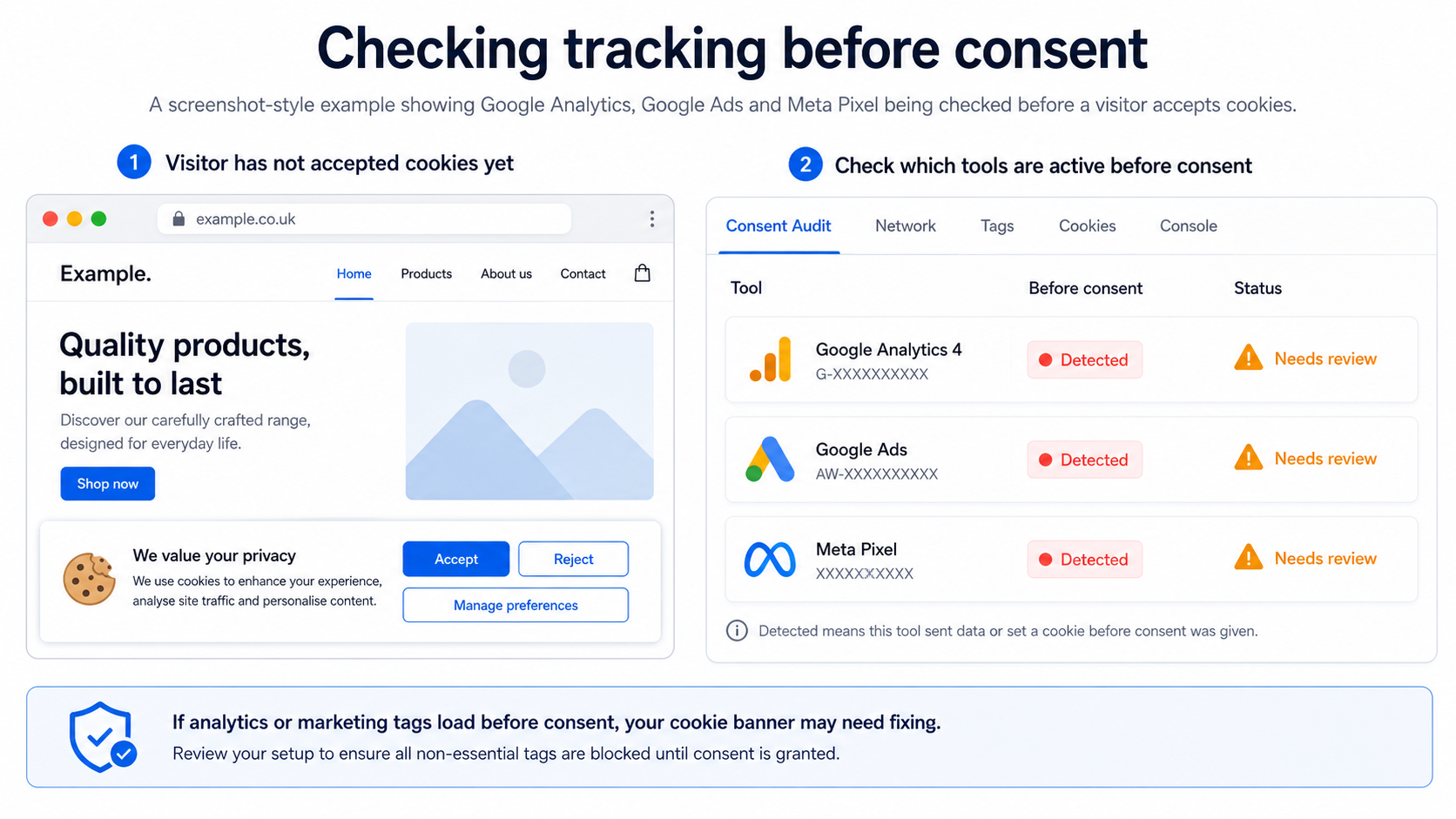
How to check whether your website tracks before consent
You can do a basic check yourself, although a proper cookie banner compliance review usually requires technical testing. Start with this simple process:
- Open your website in a private or incognito browser window.
- Do not click accept on the cookie banner.
- Check whether Google Analytics, Google Tag Manager, Google Ads, Meta Pixel or other scripts are already firing.
- Check whether analytics, advertising or marketing cookies appear before consent.
- Click reject and check whether non-essential tracking remains blocked.
- Click accept and check whether tracking activates only after consent.
- Compare the cookies actually found with the wording in your cookie policy.
If tracking is already active before the visitor gives consent, your cookie banner may need to be reconfigured. If your reject button does not stop tracking, that is also a serious practical issue.
Cookie banner compliance checklist
Use this quick checklist to spot common Google Consent Mode v2 and cookie banner problems.
- Does your banner include a clear accept option?
- Does your banner include a clear reject option?
- Are analytics scripts blocked or controlled before consent?
- Are marketing scripts blocked or controlled before consent?
- Does Google Tag Manager respect the visitor’s consent choice?
- Does Meta Pixel wait for marketing consent?
- Does Google Ads conversion tracking respect consent settings?
- Does the reject button actually stop non-essential tracking?
- Does your cookie policy match the real cookies found on the website?
- Can visitors change or withdraw their consent later?
Why this matters for paid advertising and SEO
Cookie banner compliance is not just a legal or technical issue. It can also affect marketing data quality, conversion tracking, remarketing audiences and the trust visitors have in your website.
If Google Analytics, Google Ads or Meta Pixel are misconfigured, you may end up with unreliable data, broken conversion tracking or consent choices that are not being respected. That can cause problems for both compliance and marketing performance.
For SEO, this page also matters because visitors searching for terms like “Google Consent Mode v2 UK”, “Google Analytics cookie consent UK” and “cookie banner blocking tracking before consent” are likely to have a real technical or compliance problem. That makes this a strong commercial landing page, not just an information article.
Related cookie banner guides
To continue reviewing your website, use our cookie banner guides and resources, including the tracking before consent guide, Google Analytics consent guide and Meta Pixel consent guide.
How CookieBanner.co.uk can help
CookieBanner.co.uk provides practical cookie banner and website tracking reviews for UK businesses. We can check whether your website is loading non-essential cookies or tracking before consent, whether Google Consent Mode v2 appears to be configured correctly, and whether tools such as Google Analytics, Google Tag Manager, Google Ads and Meta Pixel are firing too early.
We can also compare your cookie policy against the actual cookies and tracking technologies found on your website, helping you identify gaps and fix the areas that matter most.
- Cookie banner setup review
- Google Consent Mode v2 checks
- Google Tag Manager tracking review
- Google Analytics and Google Ads consent checks
- Meta Pixel consent checks
- Tracking-before-consent report
- Cookie policy gap review
Not sure whether your cookie banner actually blocks tracking before consent?
We can review your website and provide a practical report showing whether Google Analytics, Google Ads, Meta Pixel or other tracking tools load before consent.
Frequently asked questions
Does Google Consent Mode v2 make my website compliant?
No. Google Consent Mode v2 can support your consent setup, but it does not replace a proper cookie banner, accurate cookie policy or correct tag configuration. Your website still needs to collect and respect the visitor’s consent choice.
Do UK websites need consent for Google Analytics?
Many UK websites using Google Analytics should obtain consent before analytics tracking is used, unless a very specific exemption applies. In practice, Google Analytics should normally be controlled by the cookie banner and consent settings.
Can Google Tag Manager load before consent?
Google Tag Manager may be present on the website, but the important issue is whether it fires non-essential analytics, advertising or marketing tags before consent. Tags inside GTM should be configured to respect consent choices.
Does Meta Pixel need consent in the UK?
Meta Pixel is normally used for advertising, remarketing and conversion tracking. It should usually be controlled by the cookie banner and should not fire before the correct marketing consent has been given.
What is tracking before consent?
Tracking before consent happens when analytics, advertising or marketing technologies load before the visitor has agreed to them. This can include Google Analytics, Google Ads, Meta Pixel, TikTok Pixel, LinkedIn Insight Tag, heatmaps, live chat tools or CRM tracking.
What is the biggest cookie banner mistake?
The biggest mistake is assuming the banner works because it appears on screen. The important question is whether it actually blocks or controls non-essential tracking before consent and respects reject choices.